
That gorgeous hero image on your homepage? The one that took your designer three weeks to perfect and cost more than your monthly coffee budget? It’s probably murdering your search rankings. Most UK businesses obsess over keyword research, content calendars, and link building, whilst completely ignoring the massive files that are causing their websites more harm than good. We see this pattern constantly across British businesses. Owners upload images straight from their professional photographer, keep the original filenames like “DSC_0847.jpg,” and wonder why their beautiful website loads like dial-up internet from 1999. Meanwhile, their scrappy competitor with average-looking photos but proper image SEO is ranking higher, loading faster, and stealing customers.
What makes this particularly frustrating is how avoidable it all is. Every unoptimised image on your site actively sabotages your search performance, yet most business owners treat visual content as an afterthought. Google’s algorithms don’t care how much you spent on photography; they care about page speed, user experience, and whether your images help or hurt the people trying to use your website.
The approach most businesses take borders on self-sabotage. They either ignore image optimisation completely or follow outdated advice from 2015 blog posts that recommend keyword stuffing alt tags. Neither strategy produces the results they’re hoping for.
This guide will cover:
- What is image seo
- How to correctly use alt tags
- Image file name best practices
- Technical image optimisation fundamentals
- Stock image tips
- Advanced image SEO techniques your competitors might miss
- How to measure image SEO performance
- Common image SEO mistakes
- Image SEO FAQs
The image SEO problem nobody talks about
Image optimisation is often seen as a technical detail, but it’s actually a powerful tool for marketing performance.
While developers typically handle the implementation, marketing teams can benefit greatly from understanding its impact. For example, large header images or high-resolution product galleries, though visually appealing, can significantly slow down a site if not optimised. In fact, some images end up being many times larger than necessary, which can hurt user experience and your SEO efforts.
Google’s Core Web Vitals update changed everything. Page speed now directly impacts rankings, and images typically account for 60-80% of page weight. Yet most businesses treat image SEO like an optional extra rather than a fundamental requirement.
Data shows UK e-commerce sites lose an average of £2.6 billion annually to slow loading times. A two-second delay in mobile page load can increase bounce rates up to 103%. Your stunning visuals become expensive liabilities when they prevent customers from actually reaching your content.
We’ve audited websites where a single unoptimized image file was larger than the entire text content of the page. Business owners invested thousands in content creation while they have no idea they are sabotaging their efforts with technical incompetence.
What is image SEO?
Most guides define image SEO as “making your pictures findable in search engines.” That’s like defining a restaurant as “a place with food.” Technically accurate, but completely useless.
Proper seo image optimisation balances three competing priorities that most businesses get completely wrong. You need images that:
- Load quickly enough to keep Google happy,
- Look professional enough to maintain credibility
- Communicate effectively with search engines about your content
The common approach involves picking one priority and ignoring the rest. Photography-focused businesses upload massive files that look incredible but load like treacle. SEO-obsessed companies compress everything until their product shots look like they were taken with a potato. Both approaches fail spectacularly.
Image optimisation requires understanding how search engines actually process visual content in 2025. Google’s algorithms can now extract meaning from images, understand context, and evaluate how visuals enhance or detract from user experience.
Your image strategy needs to operate on multiple levels simultaneously. Technical optimization allows fast loading and proper indexing. Content optimization helps search engines understand relevance and context. User experience optimization keeps visitors engaged long enough to convert.
Alt tags SEO explained
Let’s talk about alt tags, because most businesses get this catastrophically wrong.
The standard advice tells you to “describe your images for accessibility.” Technically correct, but incomplete. Alt tags serve three distinct purposes that overlap but aren’t identical. These are:
- Helping visually impaired users understand content
- Communicating image meaning to search engines
- Providing fallback text when images fail to load
Most businesses approach alt tags seo badly. They either skip them entirely or stuff them with keywords like a Christmas turkey. Neither approach produces results.
Empty alt tags waste opportunities and create accessibility issues. Keyword-stuffed tags sound ridiculous when read aloud and trigger spam filters. You need to describe actual image content while naturally incorporating relevant search terms.
Take a Manchester accountant’s office photo. A terrible alt tag reads “Manchester accountant accounting services tax return bookkeeping Manchester.” A decent version says “accountant meeting with client.” The better approach describes specific content while adding useful context like “Manchester accountant reviewing financial documents with small business client.”
The best alt tags answer the question, “What would I tell someone over the phone about this image?” They’re conversational, specific, and helpful rather than robotic keyword lists.
File names for search engines
Camera manufacturers have somehow convinced an entire generation of business owners that “IMG_4829.jpg” represents an acceptable filename for professional websites.
This matters more than most people realise because search engines read filenames as ranking signals. Generic camera names provide zero SEO value and miss easy optimisation opportunities that cost nothing to implement. Yet walk through any business website and you’ll find dozens of meaningless filename strings that could have been pulling their weight for search visibility.
Strategic filenames describe image content whilst incorporating target keywords naturally. For example, a London law firm photo could be named something like “london-employment-lawyer-consultation-office.jpg” rather than leaving whatever the camera decided to call it. The difference seems small, but these details add up across hundreds of images.
A few more tips:
- Use hyphens instead of underscores to separate words, as search engines treat hyphens as spaces but underscores as single characters.
- Keep names under 60 characters to avoid truncation in search results.
- Include your primary keyword near the beginning of the filename when possible, as search engines give more weight to earlier words.
Most importantly, stay relevant to actual image content rather than trying to game the system. Don’t name a generic office photo “best-london-divorce-lawyer-reviews.jpg” when it shows a conference room. Search engines are getting better at spotting these mismatches and penalising them accordingly, so authenticity beats cleverness every time.
Technical optimisation fundamentals
File format selection confuses most business owners, but the rules are actually simpler than marketing gurus pretend.
JPEG handles photographs and images with lots of colours most effectively. It offers excellent compression whilst maintaining visual quality, making it perfect for product photos and lifestyle imagery. PNG suits graphics, logos, and images needing transparent backgrounds, though files tend to be larger. WebP provides superior compression for modern browsers but requires fallback options for older systems that don’t support it.
The compression sweet spot sits around 80% quality for most business photography. This typically reduces file sizes by 60-70% whilst maintaining professional appearance that won’t embarrass your brand. Higher compression saves bandwidth but risks visible quality degradation that makes your business look unprofessional. Lower compression wastes resources without providing noticeable visual benefits that justify the performance cost.
Responsive images adapt to different screen sizes and connection speeds automatically. Modern websites serve smaller versions to mobile devices and larger files to desktop computers, improving loading times across all devices whilst maintaining quality. This approach recognises that mobile users often have slower connections and smaller screens that don’t need massive image files.
Many content management systems offer automatic resizing, but manual optimisation often produces better results. Taking control of your image dimensions rather than relying on software means making informed decisions about quality and performance trade-offs that align with your business priorities.
Stock images without the stock look
Quality stock photography can enhance your content when chosen and implemented properly. The key phrase being “when chosen properly.” Most businesses select SEO stock images with all the strategic thinking of a toddler in a sweet shop.
Generic stock photos that appear across thousands of websites provide minimal SEO value and can damage your credibility. Google’s algorithms recognise overused images and may view sites using them as less original. Also, customers spot stock photography instantly and often perceive it as lazy or inauthentic.
The solution? Customise. Add your branding, combine multiple images, or incorporate text to overlay generic stock into unique assets. Many successful UK businesses use this approach to maintain visual consistency while preserving authenticity.
Keep in mind that licensed stock images require proper usage compliance. Using images outside their license terms creates legal risks and potential search engine penalties. Always verify usage rights and maintain records of licensing agreements.
Better yet, invest in original photography when budget allows. Even smartphone photos of real people, products, or locations often outperform polished stock imagery in terms of engagement and conversion rates.
Advanced image SEO techniques your competitors miss
Schema
Schema markup sounds intimidating but it’s just a way of labelling your images so Google understands them better. Product photos get product schema. Team headshots get person schema. Office photos get local business schema. This extra information helps your images appear in rich search results that drive more traffic.
Image sitemaps
Image sitemaps tell Google about all the visual content on your website. Most businesses rely on normal crawling to find their images, but dedicated sitemaps help with comprehensive indexing. This becomes particularly useful for e-commerce sites with extensive product catalogues that might otherwise be missed.
Lazy loading
Lazy loading has become standard practice for good reason. Instead of downloading every image when someone visits your page, it only loads images as people scroll down to see them. This makes your initial page load much faster whilst still showing all your content eventually. Most modern content management systems include this feature automatically.
Content delivery networks
Content delivery networks distribute your images from servers closer to your visitors. If you’re targeting UK customers, having your images served from European servers rather than American ones can significantly improve loading times. The difference might only be a few hundred milliseconds, but that’s enough to affect both user experience and search rankings.
Measuring your image performance
Google PageSpeed Insights gives you specific recommendations for image optimisation. Rather than guessing which images are causing problems, this tool identifies the worst offenders and suggests compression levels or format changes. Regular testing helps you maintain good performance as you add new content.
Search Console shows which of your images actually appear in search results. Many businesses have no idea that their product photos are driving traffic from Google Images, or that their carefully crafted hero images are completely invisible to search engines. This data helps you focus optimisation efforts where they’ll have the biggest impact.
User behaviour metrics often improve dramatically after image optimisation. People stay longer on pages that load quickly. They’re more likely to browse multiple pages when your site feels responsive. These engagement signals feed back into Google’s ranking algorithms, creating a positive cycle where better technical performance leads to better search visibility.
Conversion tracking becomes more reliable when images load consistently across different devices and connection speeds. E-commerce businesses particularly benefit from product photography that displays properly on mobile devices, where most online shopping now happens.
Common image SEO mistakes killing your rankings
Copyright
Copyright violations happen more often than you’d expect. Finding an image through Google search doesn’t mean you can use it legally. Getty Images and other stock agencies actively hunt for unlicensed usage and send expensive invoices to businesses that thought they were just borrowing a photo. Always verify licensing before publishing any image you didn’t create yourself.
Inconsistent optimisation
Inconsistent optimisation across your website confuses both search engines and visitors. Some pages load quickly whilst others crawl along, creating an uneven user experience that reflects poorly on your professionalism. Implementing standards for image handling prevents these problems.
Missing alt text
Missing alt text represents wasted opportunities every single day. Each image without descriptive text is a chance for better accessibility and search visibility that you’re throwing away. The time investment is minimal compared to the potential benefits.
Over-compression
Over-compression destroys visual quality without proportional performance gains. Finding the right balance requires testing different settings until you discover what works for your specific content and audience expectations.
Your image SEO action plan
1. Start with an audit of your current visual content. Check loading speeds on mobile devices, review alt text quality, and identify images using poor filenames. Focus initially on your most important pages rather than trying to fix everything at once.
2. Establish clear guidelines that anyone on your team can follow. Alt text should describe images naturally whilst including relevant keywords. Filenames should be descriptive rather than random camera codes. Image sizes should balance quality with performance across different devices.
3. Regular maintenance keeps your image SEO performing well over time. Monthly reviews help catch new problems before they accumulate. Testing page speeds and checking Search Console data shows whether your efforts are producing measurable improvements.
4. Training team members prevents future problems whilst building good habits around visual content. Content creators, designers, and marketing staff should all understand how their decisions affect search performance and user experience.
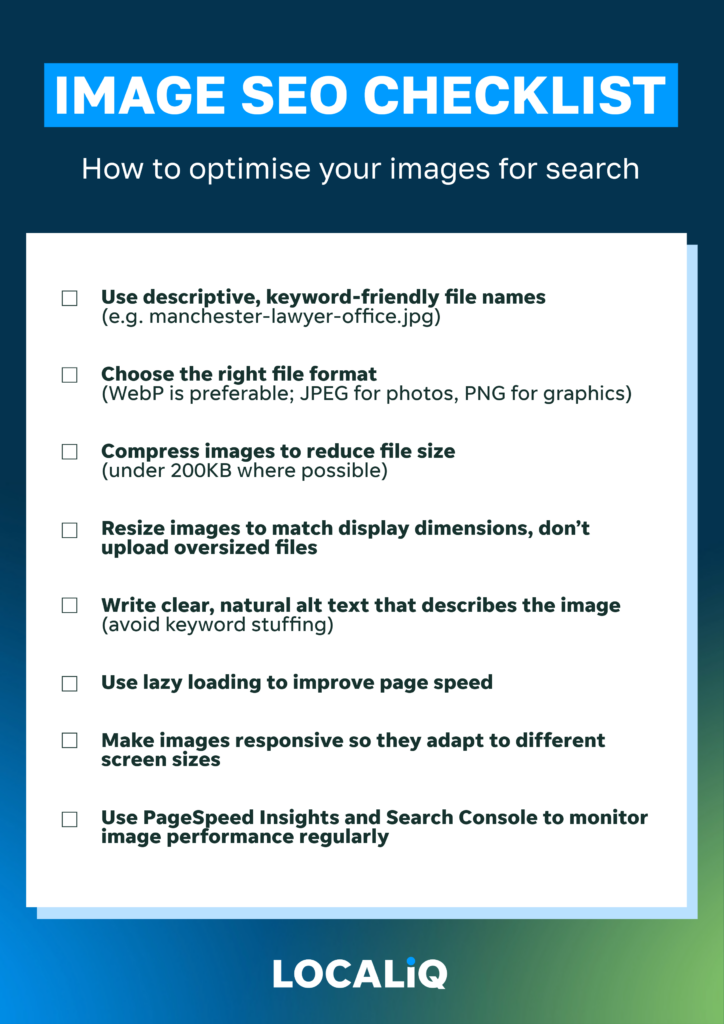
Image SEO: A Summary
Image SEO is not just a technical afterthought, it’s a powerful driver of search rankings, page speed, and user engagement. Optimised images load faster, communicate clearly with search engines, and enhance accessibility.
Businesses often sabotage performance by uploading oversized files with vague filenames and missing alt text. Proper image SEO means balancing visual quality, technical performance, and semantic relevance. From using descriptive filenames and conversational alt tags to implementing WebP formats, responsive image techniques, lazy loading, schema markup, and image sitemaps; every detail counts.
Investing in smart image optimisation not only improves your SEO, it ensures your content actually reaches the people it’s meant to impress.
Stop letting images sabotage your success
Most businesses will continue uploading massive, unoptimised images whilst wondering why their rankings suffer. They’ll keep using generic stock photography and meaningless filenames, missing straightforward opportunities to outperform competitors who make the same mistakes.
Image optimisation isn’t the most exciting aspect of digital marketing, but it’s one of the most reliable ways to improve search performance. The technical changes are straightforward to implement, the benefits are measurable, and your competitors probably aren’t doing it properly.
These strategies work regardless of your industry or technical expertise. You don’t need expensive software or advanced skills to see significant improvements in loading speeds and search visibility. You just need to stop treating images as afterthoughts and start seeing them as ranking opportunities.
Our comprehensive SEO audit examines how your images affect search performance alongside over 100 other ranking factors. We’ll identify specific problems that are costing you traffic and provide actionable recommendations for improvement.
LocaliQ UK helps businesses develop effective SEO strategies that adapt to constant changes in organic search. Get your free audit to discover how proper image optimisation can give you competitive advantages that your rivals are overlooking.
Looking to speak to someone about our award-winning SEO services instead? Contact us today to find out how we can help your business climb to the top of the search results
Image SEO: Frequently Asked Questions
What is the ideal image size for SEO in 2025?
Aim for compressed image files under 200KB for most website use, and under 100KB for mobile. Use responsive design to serve different sizes depending on the user’s device.
How do I write a good alt tag for SEO?
Describe the image in clear, natural language; like you would if explaining it to someone over the phone. Include relevant keywords only if they fit organically, and avoid stuffing them unnaturally.
Is WebP better than JPEG or PNG for SEO?
Yes. WebP offers significantly better compression while maintaining quality, which improves page speed and SEO. However, ensure your CMS supports fallback formats for browsers that don’t support WebP.
Do file names really affect image SEO rankings?
Yes, file names are an overlooked but valuable ranking signal. Search engines read them to understand image content. Instead of leaving default names like IMG_1234.jpg, use descriptive, keyword-relevant file names such as london-solicitor-consultation-office.jpg. This helps search engines index your images more accurately and improves your site’s overall SEO performance.
How often should I audit my image SEO?
At least once per quarter, and especially after major content updates. Regular audits using tools like PageSpeed Insights and Google Search Console help maintain fast performance and maximise visibility.

Related Articles

How to Optimise for AI-Powered Search: A 2026 Guide for UK Businesses

Prompt Research: The Next Step for AI Search and What UK Businesses Need to Do Now

Non-Commodity Content: What It Is and Why Your Business Needs It
How much does SEO cost in the UK? A 2026 pricing guide
Is Your Business Visible in ChatGPT, Gemini and Perplexity? Here's How to Check